
PDFs, images, emails, Pages documents, and spreadsheets stay in one local workspace instead of becoming separate mini-projects.
Court-ready exhibit automation
Drop the files. Pick the workflow. Go.
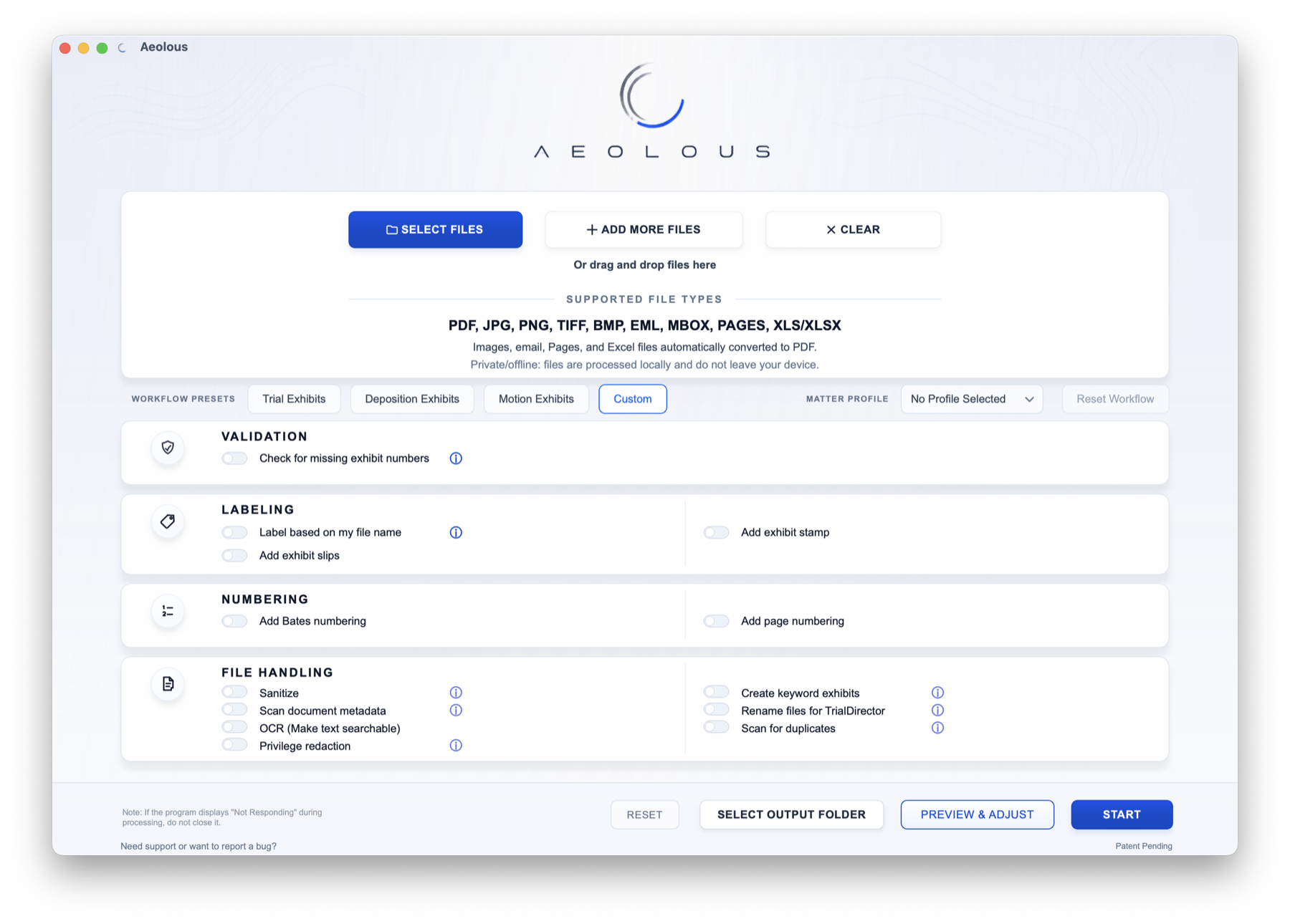
The only exhibit preparation and document review application attorneys need.
Aeolous turns messy litigation file sets into polished exhibit productions locally on your device, even when courtroom Wi-Fi, hotel internet, or travel makes cloud tools unreliable. It handles conversion, exhibit detection, labeling, slips, numbering, OCR, sanitization, trial exhibit lists, reports, and output organization in one controlled run.
Manual hours removed
Convert, label, number, validate, OCR, sanitize, create exhibit lists, and output without handing the job across separate tools.
Works without internet
Install on macOS or Windows and keep preparing exhibits on the road, in court, or anywhere a connection fails.
Preview optional
Tell Aeolous what you need, run the workflow, and get polished output without reviewing every file first.
The Aeolous run
The run stays simple because the busywork is bundled.
Instead of splitting exhibit prep across converters, stampers, spreadsheets, and checklists, Aeolous keeps the full chain in one local desktop process. The settings are chosen once, then carried through the output.
Filename labels, gaps, duplicates, metadata, and suspicious outliers are checked before the output plan is applied.
Preset or matter-profile settings drive labels, slips, numbering, OCR, sanitization, reports, and file naming from the same source.
Aeolous writes organized copies and reports while preserving the original files on-device.
Simple workflow
From mixed files to finished exhibits in one run.
Drop PDFs, images, emails, Pages files, and spreadsheets into one workspace. Choose a preset or matter profile, then let Aeolous prepare labels, numbering, OCR, reports, and output folders together.
- Mixed inputs accepted
- Preset or matter profile applied
- Organized output folder created
Intake
7 files added
PDF · PNG · EML · XLSX
Run
Trial Exhibits
Labels, slips, numbering, OCR
Output
Court-ready folder
Production PDFs and reports
Intelligent automation
Exhibit labels are read, checked, and carried forward.
Aeolous detects usable exhibit numbers and letters from inconsistent legal filenames, separates clean matches from outliers, and applies the same label plan across Preview, stamps, slips, page numbers, reports, and output naming.
- Clean labels advance automatically
- Suspicious names pause for review
- One label plan feeds the whole run
Ex. 12 Repair.pdf
Exhibit 12
13 - Site Photos.png
Exhibit 13
Appendix A Email.eml
Exhibit A
Review needed
One filename does not match the selected convention.
Privacy and security
Sensitive exhibit work stays local after install.
Aeolous is built for desktop processing, so client files can be prepared during trial, travel, or poor internet conditions without sending the document set to a third-party web service.
- No required upload
- Offline-capable workflow
- Original files preserved
Aeolous desktop
Local processing
No required upload
Client files stay on-device
Work continues offline
Aeolous features
The production tools are built in.
Aeolous covers the details that normally get split across PDF utilities, spreadsheets, legacy review apps, and hand checks: Mac and Windows desktop support, document review Preview, large-file batching, custom stamps, placement rules, Bates numbering, slips, OCR, sanitization, trial exhibit lists, reports, and organized output from one local run.
Feature 1 of 15
Feature 1 of 15
01
Mac and Windows compatible
Run Aeolous on macOS or Windows, with the same local exhibit-prep workflow available on the machines litigation teams already use.
02
Custom stamp drawing and reuse
Draw a jurisdiction-specific exhibit stamp with text, lines, color, dynamic exhibit values, and case fields, then save it for later matters.
03
Readable placement by default
When labels share a corner, Aeolous automatically offsets them and uses knockout boxes so Bates and page numbers stay readable over busy documents.
04
Filename labels, stamps, and slips
Read exhibit labels from messy filenames, apply court or deposition stamps, and generate exhibit slips from the same label plan.
05
Automatic trial exhibit lists
Build exhibit-list files from the final output set, using the same labels that drive stamps, slips, bookmarks, renaming, and production folders.
06
Bates numbering, page numbers, and OCR
Apply Bates labels, exhibit page numbers, and offline OCR. Aeolous stacks stamps, Bates, and page numbers so they do not collide.
07
Sanitization and metadata control
Strip metadata from output copies, scan source metadata locally, and save a document metadata report without changing the originals.
08
Privilege and privacy review
Flag attorney/client terms and sensitive data patterns, propose editable Preview redactions, and write audit reports for the run.
09
One review window for scattered files
Instead of opening small PDFs, images, emails, and converted files one by one in a legacy review app, Aeolous Preview keeps the set in one navigable window.
10
Huge files stay navigable
Preview never renders more than 500 pages in one batch. Large PDFs are split into smaller sections with batch navigation, so review stays usable instead of forcing an all-at-once load.
11
Client production review
Review a client's large production locally, extract selected pages into new exhibits, remove pages that do not belong in the set, and send the cleaned output through the same production run.
12
Keyword exhibits and run reports
Create keyword exhibit packets, save searchable source PDFs for hit files, and include summaries, gap reports, and output indexes.
13
Trial output organization
Rename files for TrialDirector-style workflows, combine PDFs when needed, scan duplicates, and deliver a clean production folder.
14
Matter profiles and workflow presets
Reuse matter fields, custom labels, output folders, privilege identifiers, and workflow defaults without rebuilding setup every run.
15
Optional Preview & Adjust
Preview stays available for rotation, deletion, extraction, markups, stamp placement, Bates overrides, and redaction review without becoming a required bottleneck.
PDF, JPG, PNG, TIFF, BMP, EML, MBOX, Pages, and Excel files can enter the same Mac or Windows desktop run.
Small files, converted documents, and large PDFs can be reviewed in Aeolous Preview with rotation, deletion, extraction, markup, and batch navigation.
Filename labels, missing-number checks, duplicate review, slips, stamps, and automatically generated trial exhibit lists stay on one plan.
Saved styles, placement offsets, knockout boxes, OCR, and page numbers carry through Preview and export.
Trial exhibit lists, metadata reports, privacy review, processing summaries, output indexes, TrialDirector names, and combined PDFs are packaged locally.
Large client productions can be reviewed locally, separated into useful output sets, and packaged with the same run controls.
The Aeolous advantage
Built to beat manual prep and narrow exhibit tools.
Most document tools still leave the real work to the lawyer or staff member sitting in front of them: convert this file, find that exhibit number, rebuild the folder, check the gaps, add the slip, clean the metadata, run OCR, and hope nothing drifted. Aeolous takes over the job in one local workflow.
That matters because staff time is expensive and manual review still misses small errors. Aeolous gives litigators a cleaner path: tell the app what kind of exhibit set you need, press Go, and get polished output without stitching together PDF editors, stampers, spreadsheets, and checklists.
What has to be right
Aeolous
General PDF tools
Single-purpose exhibit tools
Complete exhibit-prep workflow in one place
Integrated run
Manual assembly
Partial workflow
Effective cost of getting from mixed files to court-ready exhibits
One license, automated run
Subscription plus staff time
Extra tools plus review time
Exhibit detection, gap checks, duplicate review, trial exhibit lists, and reports
Built in
Separate work
Manual follow-up
Custom stamp drawing, saved jurisdiction styles, automatic offsets, and knockout readability
Purpose-built
Generic stamps
Often preset-bound
OCR, metadata scan, sanitization, Bates/page numbering, slips, conversion, and output organization
One run
Tool-hopping
Partial
Local desktop workflow for sensitive client files
Designed for it
Generic, not exhibit-specific
Often browser/session dependent
Production-grade automation
Hours or days of exhibit prep, compressed into one controlled run.
Aeolous handles the repetitive, detail-sensitive work that makes exhibit preparation slow and error-prone. The result is cleaner and more consistent work product than manual assembly, without turning the attorney or paralegal into a full-time PDF operator.
01
One run, mixed inputs
PDF, images, email files, Pages, and spreadsheets enter the same workflow without forcing attorneys to pre-sort every file.
02
Built-in production checks
Exhibit sequences, duplicate risks, filename detection, and missing numbers are checked inside the workflow before the final output leaves your machine.
03
Preview only when you want it
Optional Preview & Adjust is there for attorney control and fine-tuning, not as a required bottleneck before every batch.
Pricing
The exhibit-prep system for litigators who need the output right.
Aeolous is priced around the real cost it removes: attorney time, paralegal overtime, tool subscriptions, rework, and the risk of production mistakes in exhibit sets that have to be right.
Each license is built for private desktop use: install Aeolous locally, keep client files on your device, work without a live internet connection, preserve originals, and create polished exhibit outputs without stitching together separate tools.
Contact
Questions about Aeolous, licensing, or support?
Send a note and choose the closest topic. For app bugs, the desktop app's Report a bug option is best because it can include the recent processing log without attaching client documents.
Use the form and we will reply to the address you provide. Do not include client documents, confidential matter details, license tokens, or credentials.
Common questions
Built for legal files, not generic document tinkering.
No. After installation, Aeolous is built for local desktop processing, so exhibit work can continue in court, during travel, or anywhere internet access is unreliable.
No. Processing creates new output copies and preserves the original source files.
No. Preview & Adjust is available when you want attorney control or fine-tuning, but the main workflow is built so users can run confidently without batch-previewing every file first.
PDF, JPG, PNG, TIFF, BMP, EML, MBOX, Pages documents, and Excel spreadsheets are supported in the current workflow.